
How to Use Our Remote GSOO1R: A Step-by-Step Guide
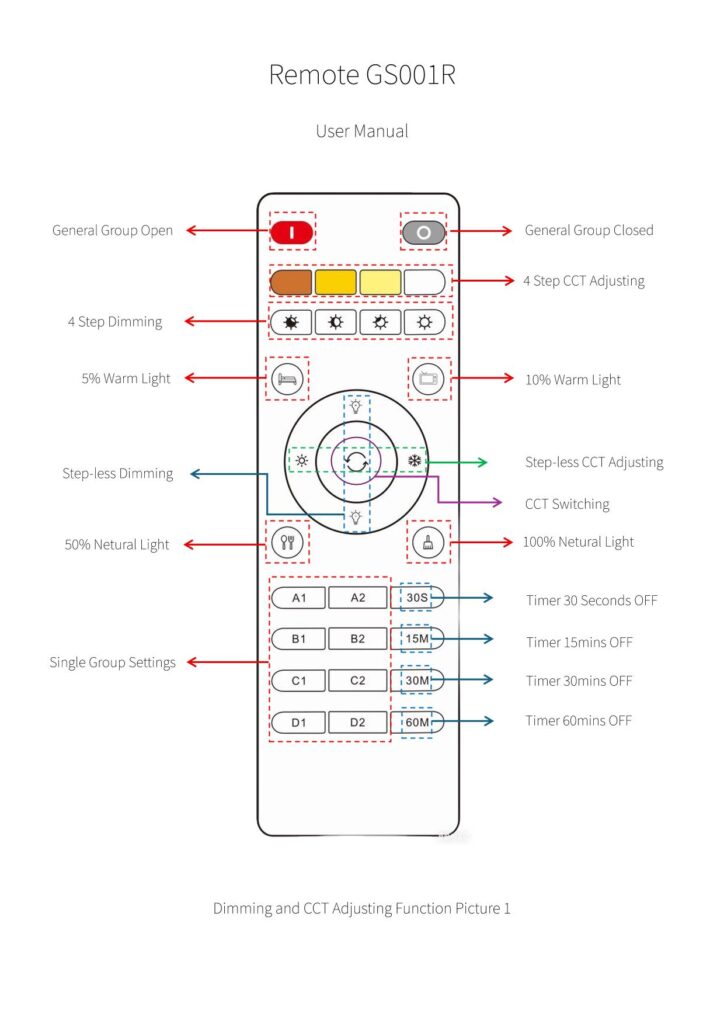
Remote GS001R:
Model: GS001R
Color: White
Material: Plastic
Battery: AAA*2 Endurance Time about 2 years
Communication Protocol: RF-2.4G
Controllable Distance: ≤ 30 Meters
Function: Single Group Control, General Group Control, Dimming and CCT Adjusting, 4 Preset Scene Modes, Timer-off Modes.
Operation Instruction
1. Single Group Control
1.1 Single Group Open Key
There are four single group open keys, they are A1, B1, C1, D1.
Function No.1
−To pair codes: Turn on the lights you want to bind to Group A, then long press A1 key to pair codes in 5 seconds, the lights will blink one time and finish pairing. (Similarly, for Group B1/C1/D1)
−To turn on the lights: Click A1 key, all lights in group A1 are turn on. (Similarly,for Group B1/C1/D1)
1.2 Single Group Closed Key
There are four single group closed keys, they are A2, B2, C2, D2.
Function No.1
−To clear codes: Turn on the lights you want to unbind, then click A2 key five times consecutively in 5 seconds, the lights will blink one time means clear code completed. (Similarly, for Group B2/C2/D2)
Function No.2
−To turn off the light: Click A2 key, all lights in group A2 are turn off. (Similarly, for Group B2/C2/D2)
2. General Group Control
2. 1“ ”key means General Group Open
−Turn on the lights, long press “ ”key to pair codes in 5 seconds, the lights will blink one time and finish pairing. Meanwhile, they will be automatically grouped into group A1. (※Noticed, normally, we do not use this button for grouping; instead, we use A1 or B1 or C1 or D1 for that.)
−Click “ ”, all lights in different groups are turn on.
2.2“ ”key means General Group Closed
−Turn on the light, click “ ”key five times consecutively in 5 seconds, the light will blink one time and clear code completed. (※If you use this button to clear code, all lights in different groups will be clear code together.)
−Click “ ”,all lights in different groups are turn off.
3. About Timer-off Functions(30s/15mins/30mins/60mins)
First, press one of the single group open buttons(A1/B1/C1/D1). Second, press one of the timer-off function buttons(30S/15mins/30mins/60mins). Then, the light flickering indicates that it has entered the timer-off mode. (※After pressing the timer function button, do not perform any other operations on the remote control, otherwise, the selected timer function will be automatically canceled.)
4.Scene & Dimming and CCT Adjusting Functions
The functions of GS001R as picture 1
4.1 Four frequently used preset scenarios as follow:
| Key | Preset Scenarios |
 | Rest mode→5% Warm light |
 | Entertainment mode→10% Warm light |
 | Dinning mode→50% Neutral light |
 | Cleaning mode→100% Neutral light |
4.2 Dimming and CCT Adjusting Functions as follow:
| Key | Dimming and CCT |
 | Click to increase brightness by one level or long press to increase brightness |
 | Click to decrease brightness by one level or long press to decrease brightness |
 | Click to decrease CCT by one level or long press to decrease CCT |
 | Click to increase CCT by one level or long press to increase CCT |
 | Click to switch the warm light>neutral light> white light (Brightness keep same) |